Minecraft 26.2 Snapshot 1
Release: 4 months ago
We are back in the shipping room once more with a jam-packed snapshot Tuesday!
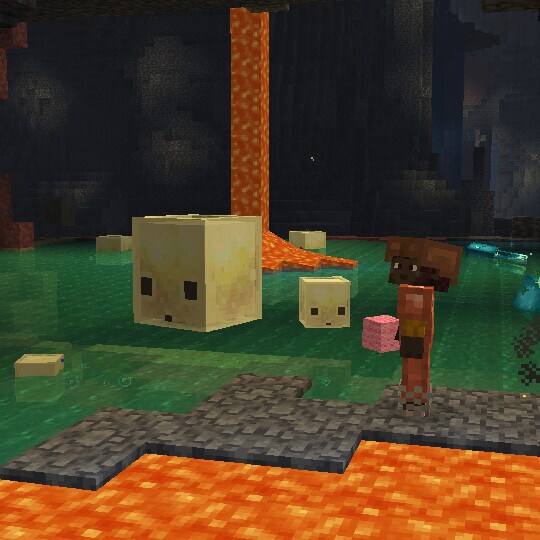
Test the first features from our next drop, Chaos Cubed! Scour the Overworld for sulfur springs and then dig down to discover what lies below. Meet the sulfur cube – a curious new mob with a transformative appetite for blocks. Experiment by feeding it different blocks and test how the sulfur cube reacts, explore its home in the sulfur caves, mine for new cinnabar and sulfur blocks, and more.
And that's not all! With today's release we are also bringing Vulkan support into snapshot testing. This is a major step towards bringing Vibrant Visuals to Java Edition, as previously mentioned in this article: Another step towards Vibrant Visuals. Players will be able to toggle between OpenGL and Vulkan during the testing period, and we will stay in the testing period until we're confident that the Vulkan implementation is stable, performant and ready.
The default option for this snapshot will be to use Vulkan if supported, but this may change in the future as we receive more feedback.
Happy mining!
New Features
- Added support for rendering the game through Vulkan
- Added new option "Graphics API" in Video Settings
Sulfur Cube mob
- Added the Sulfur Cube mob
- Spawns in the new Sulfur caves biome
- When a Player interacts with it while holding a block, the Sulfur Cube will absorb the block and disable its AI
- With a block inside, a Player can also interact with the Sulfur Cube while holding Shears to shear the block. This enables its AI
- The Sulfur Cube will follow a Player holding a block it can absorb
- The Sulfur Cube can also look for block items nearby and move towards them to absorb them
- When killed, the Sulfur Cube splits into two smaller Sulfur Cubes
- The small Sulfur Cubes can be tempted and fed with Slime Balls to grow them into large Sulfur Cubes
- With a block inside, the Sulfur Cube will not take any fall or Player damage and will become a physical object that players can interact with by punching and pushing
- With a block inside, it will assume one of the archetypes (listed below) and change its physical properties to match the block it absorbs
- A large Sulfur Cube can be picked up using an empty bucket
- Dispensers can now equip and swap blocks inside a Sulfur Cube, as well as shear it with Shears to remove the block it is holding
- Dispensers can spawn a Sulfur Cube from a Bucket of Sulfur Cube.
Sulfur Cube archetypes
- Each archetype is characterized by the speed of the ball when hit, how bouncy it is when colliding with blocks and collidable entities, as well as its ground friction, air drag and if it floats in liquids
- There are the following archetypes:
- Regular: medium speed, medium bounciness, medium ground friction and low air drag
- It is buoyant
- Used when absorbing stone and mineral blocks
- Bouncy: fast speed, high bounciness, medium ground friction and low air drag
- It is buoyant
- Used when absorbing wooden blocks
- Slow Flat: slow speed, low bounciness, medium ground friction and medium air drag
- Used when absorbing metal blocks
- Fast Flat: fast speed, low bounciness, medium ground friction and low air drag
- Used when absorbing organic blocks
- Light: slow speed, high bounciness, medium ground friction and high air drag
- It is buoyant
- Used when absorbing all wool blocks
- Fast Sliding: fast speed, no bounciness, low ground friction and low air drag
- Used when absorbing icy blocks
- Slow Sliding: slow speed, no bounciness, low ground friction and low air drag
- Used when absorbing shroom blocks
- Regular: medium speed, medium bounciness, medium ground friction and low air drag
- There are also two special archetypes:
- High Resistance: very slow, low drag with low bounce with high friction
- Used when absorbing Soul Sand and Soul Soil
- Sticky: same properties as a golf ball, but sticks with extremely high ground friction and no bounce to simulate stickiness
- Used when absorbing Honeycomb Block
- High Resistance: very slow, low drag with low bounce with high friction
Cinnabar and Sulfur block sets
- Added Cinnabar and Sulfur stone block sets
- Each of them has the Polished and the Bricks variants
- Each variant has its Slabs, Stairs and Walls blocks
- Added Chiseled Cinnabar and Chiseled Sulfur blocks
Sulfur caves biome
- Added sulfur caves underground biome
- Now generate naturally underground and inside hills or mountains
- The sulfur caves biome has bands of sulfur and cinnabar
- Spawns the new Sulfur Cube mob as well as Cave Spiders
- Generates with Sulfur Pools which contain Potent Sulfur
Potent Sulfur
- Is a new block that generates naturally in water pools inside the sulfur caves biome
- Produces bubbles which rise up to 4 water source blocks above it
- When placed underneath up to 4 water source blocks, it generates a cloud of nausea-causing gas on the water surface
- This cloud spreads across adjacent water with a maximum radius of 3 blocks
- Can be crafted from 9 Sulfur blocks
- The Potent Sulfur Block can be crafted into 4 Sulfur Blocks
Sulfur Spring
- Is a new feature which generates naturally above the sulfur cave biome
- Consists of Sulfur, Potent Sulfur and Magma Blocks
- Sulfur Springs come in 4 different size variants:
- Small
- Medium
- Large
- Extra Large
Vulkan Support
- As previously announced, we intend to switch the game from OpenGL to Vulkan
- Vulkan is not supported by older hardware or drivers - OpenGL will be used as a fallback on those cases
- The current requirement is Vulkan 1.2 with dynamic rendering and push descriptors, but this requirement may increase or decrease over time
- This is currently an experimental rendering backend, and may not be as performant or stable. Please report any bugs you find with it to our bug tracker!
- Under Vulkan, we will prefer your dedicated graphics card over any integrated graphics, which is a change from OpenGL
- You can see which backend is being used in your F3 debug overlay (in the
system_specssection) - On MacOS, we use MoltenVK to translate Vulkan to Metal
"Graphics API" Video Setting
- This is a new option available in the "Video Settings"
- There are three values: Default, Prefer Vulkan and Prefer OpenGL
- "Default" may be changed at our discretion, and we recommend this for all users unless you experience issues and need to change
- Currently, it is the same as "Prefer Vulkan"
- "Prefer Vulkan" will attempt to render using Vulkan, but fall back to OpenGL if it doesn't work
- "Prefer OpenGL" will attempt to render using OpenGL, but fall back to Vulkan if it doesn't work
Changes
- Fixed baby Hoglin's and Zoglin's left ear texture so it's properly mirrored
Minor Tweaks to Blocks, Items and Entities
- When an entity bounces off of a block or other collidable entity, it emits a vibration of frequency 2
Developer's Note: We have tweaked how Beds and Slime Blocks restitute entity velocity after collisions. For instance, when air drag is removed via the entity attribute, Slime Blocks will now correctly bounce Mobs indefinitely. This may affect player perception of the bounciness of Beds and Slime Blocks.
Sounds
Added block sounds for Sulfur, Potent Sulfur and Cinnabar Added mob sounds for Sulfur Cube and Small Sulfur Cube
Technical Changes
- The Data Pack version is now 101.2
- The Resource Pack version is now 85
- Profiling the game with Tracy (launching with
--tracy) now includes GPU timings - Rendering now uses a reversed depth buffer, which helps with Z-fighting on most hardware
Data Pack Version 101.2
- Added
minecraft:sulfur_cube_archetyperegistry with the following values:regularbouncyslow_flatfast_flatlightfast_slidingslow_slidinghigh_resistancesticky
- Entry format: Object with fields:
items: item tag that contains all items that can be fed to Sulfur Cubes of this archetypebuoyant: boolean indicating if the Sulfur Cube of this archetype floats in liquidsattribute_modifiers: a list of objects with fields:attribute: attribute to modifyid: unique identifier for the modifieramount: amount to modify the attribute byoperation: how to modify the attribute, one ofadd_value,add_multiplied_baseandadd_multiplied_total
Commands
- When granting or revoking several advancements, the command output will now report how many advancements changed state across all players
- When granting or revoking advancements or a criterion on several players, the command output will now report the number of players that any change applied to
Attributes
Added minecraft:bounciness
- Determines what portion of the velocity is restituted after the entity collides with blocks and collidable entities
- When landing on bouncy blocks, like Beds and Slime Blocks, the higher bounciness (of the block or the entity) is applied
- Accepts values between `0.0` and `1.0`
- Default value: `0.0` - no velocity is restituted
- Maximum value: `1.0` - full velocity is restituted, collisions with blocks and collidable entities will have no effect on lowering the velocity
Added minecraft:friction_modifier
- Determines how much ground friction is applied to the entity with regards to the block it is on
- Accepts values between `0.0` and `2048.0`
- Default value: `1.0` - friction of blocks is not modified
- Minimum value: `0.0` - friction of blocks is reduced to zero
- Values higher than `1.0` increase the friction applied to the entity from the blocks it is on
Added minecraft:air_drag_modifier
- Determines how much drag is applied to an entity while in the air
- Accepts values between `0.0` and `2048.0`
- Default value: `1.0` - the entity uses existing drag when moving in the air
- Minimum value: `0.0` - no drag is applied to the entity
- Values higher than `1.0` increase the drag applied to the entity when moving through the air
Updated the minimum value of minecraft:knockback_resistance
- The minimum value was changed from `0.0` to `-2.0`
Data Components
Added minecraft:sulfur_cube_content
- Represents the item that is absorbed by the Sulfur Cube
- Format: item that is absorbed by the Sulfur Cube
- e.g.
minecraft:sulfur_cube_content=green_wool
- e.g.
World Generation
Dripstone Features
- Renamed Feature Type
pointed_dripstonetospeleothem- Added field
base_block- Block State, describes the block forming the base of the Speleothem - Added field
pointed_block- Block State, describes the block creating the columns of the Speleothem - Added field
replaceable_blocks- Block ID, list of Block IDs, or hash-prefixed Block Tag describing which blocks this feature can generate on - Renamed field
chance_of_taller_dripstonetochance_of_taller_generation
- Added field
- Renamed Feature Type
dripstone_clustertospeleothem_cluster- Added field
base_block- Block State, describes the block forming the base of the Speleothem - Added field
pointed_block- Block State, describes the block creating the columns of the Speleothem - Added field
replaceable_blocks- Block ID, list of Block IDs, or hash-prefixed Block Tag describing which blocks this feature can generate on - Renamed field
dripstone_block_layer_thicknesstospeleothem_block_layer_thickness - Renamed field
chance_of_dripstone_column_at_max_distance_from_centertochance_of_speleothem_at_max_distance_from_center - Renamed field
max_distance_from_edge_affecting_chance_of_dripstone_columntomax_distance_from_edge_affecting_chance_of_speleothem
- Added field
- Adjusted Feature Type
large_dripstone- Added field
replaceable_blocks- Block ID, list of Block IDs, or hash-prefixed Block Tag describing which blocks this feature can generate on
- Added field
Added noise_gradient Surface Rule
Replaces blocks based on the specified noise and gradient list.
Format: object with fields:
noise- noise id, the noise to samplegradient- non-empty list of objects with fields, the list to sample based on the noise value:state(optional) - the block state to select at this index- If this field is not defined, the surface rule will not replace any block when sampling this entry
Added sequence Feature Type
Generates a list of Placed Features in order. If any feature in the list is not placed, the following features will also be skipped.
Format: object with fields:
features- list of Placed Features or hash-prefixed Placed Feature tag, the features to generate
Added template Feature Type
Places one template randomly chosen from the given Weighted List of Identifiers. By default, the template will be spawned randomly rotated, centered around the origin.
Format: object with fields:
templates- Weighted List of structure template entries. Each structure template entry is composed of an Identifier and a list of rotations to randomly choose fromid- The template Identifierrotations- Optional list of rotations to choose from and apply to this template if it is picked- Allowed values:
none,clockwise_90,180,counterclockwise_90 - If not specified, defaults to all allowed values
- Allowed values:
Dimension Types
- The field
infiniburnnow also accepts an ID and a list of IDs in addition to a tag
Configured Features
minecraft:geode
- The fields
cannot_replaceandinvalid_blocksinblockssection of feature configuration now also accept an ID and a list of IDs in addition to a tag
minecraft:root_system
The field root_replaceable in the feature configuration now also accepts an ID or a list of IDs in addition to a tag
minecraft:vegetation_patch
- The field
replaceablein the feature configuration now also accepts an ID and or a list of IDs in addition to a tag
minecraft:waterlogged_vegetation_patch
- The field
replaceablein the feature configuration now also accepts an ID and or a list of IDs in addition to a tag
Structure Processors
minecraft:protected_blocks
- The field
valuenow also accepts an ID or a list of IDs in addition to a tag
Tags
Block Tags
- Added
#suppresses_bounce- all blocks that suppress the bounciness of entities when colliding with them - Added
#glazed_terracotta,#concreteblocks collection tags #concrete_powdercollection tag has been renamed to#concrete_powders- Added
#shears_extreme_breaking_speedfor blocks that can be broken with shears with speed 15 - Added
#shears_major_breaking_speedfor blocks that can be broken with shears with speed 5 - Added
#shears_minor_breaking_speedfor blocks that can be broken with shears with speed 2
Item Tags
- Added
#glazed_terracotta,#concrete, and#concrete_powdersitems collection tags - Added
#sulfur_cube_food- all items that can be fed to small Sulfur Cube - Added
#sulfur_cube_swallowable- all items that can be placed inside a large Sulfur Cube - Added the following tags for items that can be placed inside a Sulfur Cube to determine its archetype:
#sulfur_cube_archetype/regular#sulfur_cube_archetype/bouncy#sulfur_cube_archetype/slow_flat#sulfur_cube_archetype/fast_flat#sulfur_cube_archetype/light#sulfur_cube_archetype/fast_sliding#sulfur_cube_archetype/slow_sliding#sulfur_cube_archetype/high_resistance#sulfur_cube_archetype/sticky
Entity Tags
minecraft:sulfur_cubeis added tonon_controlling_rider- Added
minecraft:sulfur_cube_with_block_immune_tofor all damage types that Sulfur Cubes are immune to when having a block absorbed - Updated
not_scary_for_pufferfishto include the Sulfur Cube
Game Events
Added minecraft:bounce
- Emitted when an entity collides with a block or a collidable entity with non-zero bounciness
- Has a vibration frequency of
2
Particles
- Added
sulfur_cube_goo- particles showing on a Sulfur Cube mob when hopping around
Resource Pack Version 85
Block Sprites
- Added new Block textures:
block/chiseled_cinnabar.pngblock/chiseled_sulfur.pngblock/cinnabar.pngblock/cinnabar_bricks.pngblock/polished_cinnabar.pngblock/polished_sulfur.pngblock/potent_sulfur.pngblock/sulfur.pngblock/sulfur_bricks.png
Item Sprites
- Added new Item sprites:
item/sulfur_cube_bucket.png
Entity Textures
- Added new Entity textures:
entity/sulfur_cube/sulfur_cube_outer.pngentity/sulfur_cube/sulfur_cube_inner.png
Sounds
- Added sounds for Sulfur Block:
block.sulfur.breakblock.sulfur.hitblock.sulfur.placeblock.sulfur.stepblock.sulfur.fall
- Added sounds for Potent Sulfur Block:
block.potent_sulfur.breakblock.potent_sulfur.hitblock.potent_sulfur.placeblock.potent_sulfur.stepblock.potent_sulfur.fallblock.potent_sulfur.noxious_gas
- Added sounds for Cinnabar Block:
block.cinnabar.breakblock.cinnabar.hitblock.cinnabar.placeblock.cinnabar.stepblock.cinnabar.fall
- Added sounds for Sulfur Cube:
entity.sulfur_cube.jumpentity.sulfur_cube.squishentity.sulfur_cube.hurtentity.sulfur_cube.deathentity.sulfur_cube.absorbentity.sulfur_cube.ejectentity.sulfur_cube.bounceentity.sulfur_cube.hitentity.sulfur_cube.push
- Added sounds for Small Sulfur Cube:
entity.small_sulfur_cube.jumpentity.small_sulfur_cube.squishentity.small_sulfur_cube.hurtentity.small_sulfur_cube.death
Shaders & Post-process Effects
- The
core/rendertype_text,core/rendertype_text_see_through,core/rendertype_text_intensity,core/rendertype_text_intensity_see_through,core/rendertype_text_background, andcore/rendertype_text_background_see_throughshaders have been replaced bycore/textandcore/text_background- Variants are now controlled by shader defines:
IS_GUI,IS_SEE_THROUGH, andIS_GRAYSCALE
- Variants are now controlled by shader defines:
Fixed bugs in 26.2 Snapshot 1
- MC-236770 The "Ambient" and "Axolotl" mob caps both display as "A" in the debug overlay
- MC-252814 The
clampdensity function takes a direct input and doesn't allow a reference - MC-269520 The game freezes when using /locate in a world without structures enabled
- MC-269786 "ID" is not capitalized in some strings
- MC-277395 The "options.screenEffectScale.tooltip" string displayed when holding your mouse cursor over the "Distortion Effects" slider is improperly capitalized
- MC-277396 Strings referencing nether portals are inconsistently capitalized
- MC-279122 Some strings that contain the abbreviation "id" are improperly capitalized
- MC-279125 Some "/locate" strings are missing articles before the word "reasonable"
- MC-279126 The "mco.configure.world.restore.download.question.line1" string incorrectly spells the word "singleplayer" as "single player"
- MC-279137 The "options.directionalAudio.on.tooltip" string is missing a hyphen between the words "HRTF" and "compatible"
- MC-279138 The "command.failed" string is missing a conjunction
- MC-279154 The "advancements.story.enter_the_nether.description" string is missing a serial comma
- MC-279156 The titles within some player reporting and punishment menus are improperly capitalized
- MC-279158 The "I know what I'm doing!" button is improperly capitalized
- MC-279182 Strings used to describe water and lava conversion game rules are missing commas
- MC-279183 The "options.allowServerListing.tooltip" string is missing a comma
- MC-279184 The "datapackFailure.title" string is missing an article and always pluralizes the word "pack"
- MC-279186 The "build.tooHigh" string is missing an article before the word "Height"
- MC-279189 The "mco.configure.world.leave.question.line1" string is missing a comma
- MC-302488 Strings that contain the term "Safe Mode" are inconsistently capitalized
- MC-302628 Dolphins don't dismount minecarts when passing over activator rails
- MC-304113 Underwater fog is not applied correctly at low render distances
- MC-304873 The "options.textureFiltering.rgss.tooltip" string is missing a hyphen between the words "shader" and "based"
- MC-304874 The "options.textureFiltering.anisotropic.tooltip" string is missing a hyphen between the words "hardware" and "based"
- MC-305467 The ender dragon's death animation effects render in front of worn armor
- MC-306064 Mobs can be forced to look like they're dying while they aren't by using commands
- MC-306399 The Spectator mode 'Teleport to Player' action only updates the list of valid targets after the Spectator menu is hidden
- MC-306890 Campfires cause bees to work much more slowly
- MC-306903 Cubic Bézier easing functions sometimes produce wrong values
- MC-306946 The block light transition from level 1 to 0 under the night sky is not smooth when Smooth Lighting is enabled